INF1020: Management Information Systems - Homework Assignments
HW #
Assignment
HW #9
Submit the following to the HW9 folder on the Lessons tab of Angel.
Create a powerpoint presentation. The presentation should be on a single topic. There should be a logical flow to the presentation - don't just create "example" slides that have no real meaning. The presentation should contain the following:
At least 6 slides
Some slides with different formats (e.g. one column of bullets, two columns of bullets, a table, bullets and a table, etc)
At least one "design template"
A "title master" that contains an image or other formatting to be applied to all title slides
A "slide master" that contains an image or other formatting to be applied to all detail slides
Some pictures
Animated trasition on slides
HW #8
Read Chapter 10 - "Databases" in the Computer Concepts book.
HW #7
Submit the following to the HW7 folder on the Lessons tab of Angel.
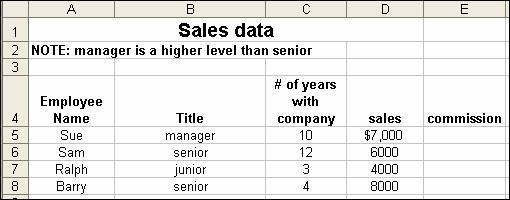
Write a formula to be placed in cell E5 that evaluates the
dollar amount of the commission for the employee in row
5. The commission should be evaluated according to the following rules. Make
sure that you write the formula such that when the formula is copied to subsequent
rows 6, 7, 8, etc the formula continues to work correctly for the data in that
row.
Commission Rules:
30%
commission – for managers and seniors
20%
commission – for all others who either
Were
with the company at least 5 years OR
Have
made at least $500 in sales
all
others get no commission
QUESTION #2
Follow the same directions as for the previous question
EXCEPT use the following commission rules instead:
Commission Rules:
30%
commission –
for
managers AND
for
seniors who have at least $10000 in sales
20%
commission – for anyone else who has been with the company at least 5
years
10%
commission for everyone else
HW #6
Submit the following to the HW6 folder on the Lessons tab of Angel.
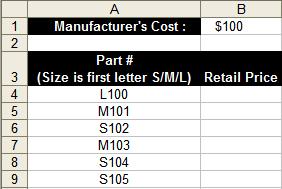
Cell B1 of the following spreadsheet shows the cost to a manufacturer for producing a single widget. Rows 4 through 9 of the spreadsheet show part numbers for the individual widgets that were produced. Each widget has a unique part number. The first character of the part number indicates the size of the widget (S=small M=medium L=large).
Write a formula that calculates the price of a widget based on the following rules:
Small widgets : 110% of cost
Medium widgets: 120% of cost
Large widgets : 130% of cost
Write the formula that would be placed in cell B4. Write the formula so that it remains correct if it is copied to the other cells in column B.
Do the same as the previous problem but this time use the following rules :
Small widgets : 110% of cost
Medium widgets: 120% of cost
Large widgets : 130% of cost
Extra Large widgets : 140% of cost
You should assume that extra large widgets have the letter "X" as the first character of their part numbers.
HW #5
Answer the questions that are listed in the following excel spreadsheet.
Show how Excel computes the value of the following formulas. Pay careful attention to the "order of operations".
=3*2^(4/(2+1-2))
=7^3-1*(5-3)+5
HW #3 (assigned W. Sept 6, 2006)
How many MB in 1 TB?
How fast can a 500 MB file be sent over a 500 MbPS line?
What is faster, a 2000 MbPS line or a 2.0 GbPS line? Explain.
HW #2 (assigned W. Aug 30, 2006)
Read Chapter 2 - "Computer Hardware" in the Computer Concepts book. You are responsible for both material that we did and the material that we did NOT discuss in class.
HW #1 (assigned W. Aug 23, 2006)
By the next class you are expected to have read and understand everything from the following sections of the Office 2005 book. Note: don't be concerned abou the length of the material. This material covers very basic computer skills that most students already have. Please review the material to fill in any gaps that you may have in your knowledge.:
Windows: WIN 1, WIN 2, WIN 3
File Management: FM 1, FM 2, FM 3
Internet: BEB1, BEB2, BEB3
Review the material from the "Basic Windows Terms" and "Windows Explorer" powerpoints on the yrosenthal.com website.
Create a set of folders and files as follows.
Create one folder that includes one word file and two additional folders. The Word file should be an empty word file. NOTE THE SIZE OF THE EMPTY WORD FILE (it will not be zero).
In the first sub-folder from the previous step, create another Word document that is at least 50 KiloBytes(KB) but not more than 100KB. The contents of the file can be whatever you wish.
In the 2nd sub-folder from step 1, create another Word document that is at least 100KB but not more than 200KB.
Create a compressed folder (i.e. zip file) that contains your entire folder hierarchy. NOTE THE SIZE OF THE COMPRESSED FOLDER.
Upload the compressed file to the appropriate folder on Angel. In the notes on your submission, write down (1) the size of the "empty" Word file (2) the size of the compressed folder and (3) Why do you think the size of the empty word file is NOT zero (4) Write the "full path" for each of the Word files that you submitted (you don't need to specify the drive letter).